Built-in functions
Try me


What are built-in functions?
Python comes pre-stocked with an array of built-in functions (functions that are already defined in Python). They are part of the Python language itself and are always available, just waiting for you to use them. These functions are like your handy multi-tool - ready to help, whether you need to open a can, tighten a screw, or measure something.
Imagine you’ve just moved into a new home 🏚️. Imagine your new home comes pre-furnished with some essential items: a comfy bed, a spacious wardrobe, and maybe a well-stocked fridge to celebrate your house-warming party 🍾 . Python’s built-in functions are just like these items - they’re already there, ready for you to use. You don’t have to go shopping to start enjoying your house!
To find out what’s in this toolbox, check out the ‘IKEA catalogue’ of Python’s built-in functions in the Python documentation. It’s your one-stop-shop to discover all the tools Python offers right out of the box!
To get ready to unpack the power of Python’s built-in functions, your secret weapon in your journey of Python programming this tutorial includes some guidelines to read documentation and a cheat sheet to quickly access outstanding built-in functions 🚀
How to read documentation
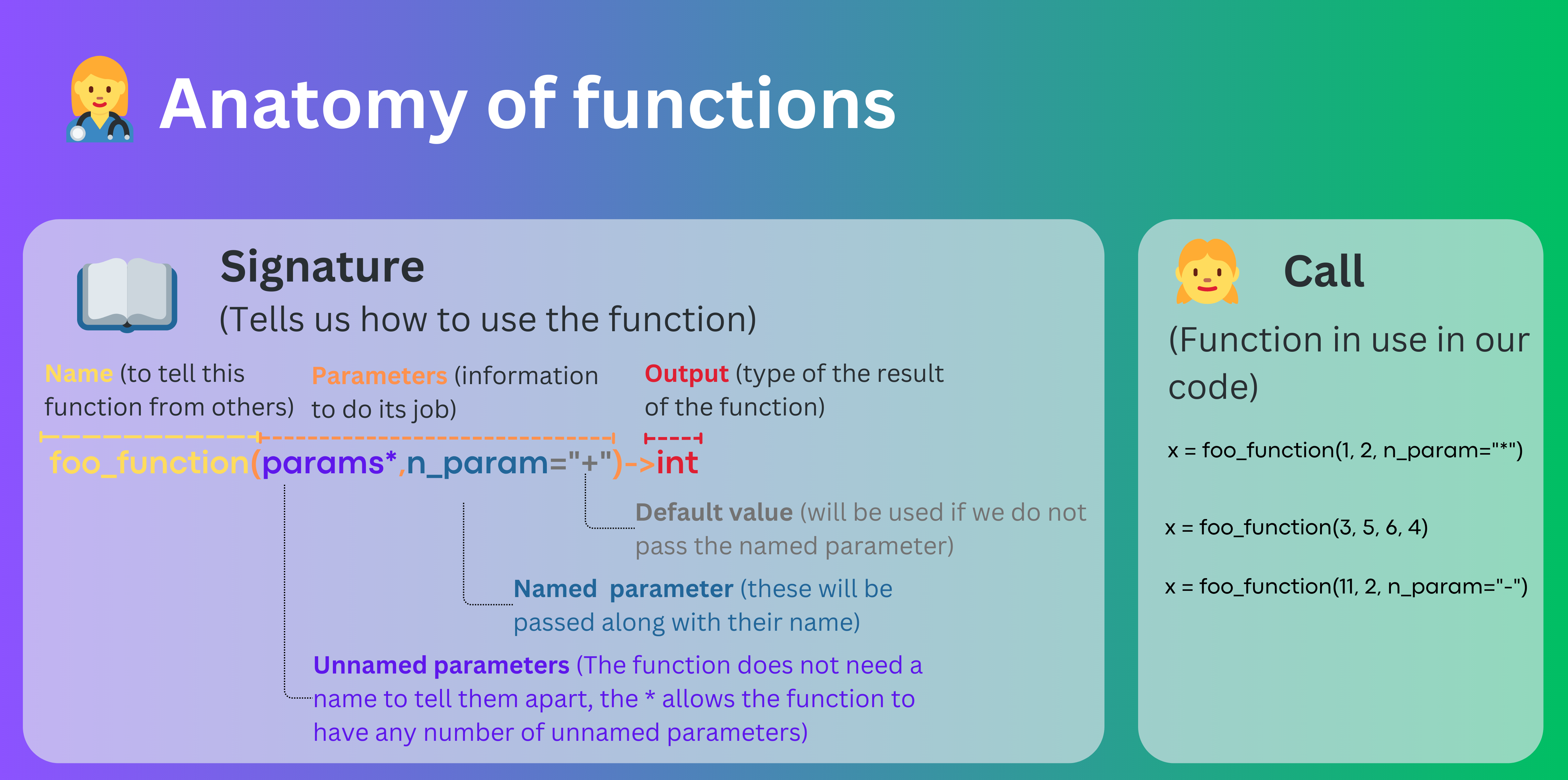
Let us take for example the built-in function print(). The documentation for this function can be found here. At the time of writing, the documentation for this function looks like this:
print(*objects, sep=’ ‘, end=’\n’, file=None, flush=False) Print objects to the text stream file, separated by sep and followed by end. sep, end, file, and flush, if present, must be given as keyword arguments. All non-keyword arguments are converted to strings like str() does and written to the stream, separated by sep and followed by end. Both sep and end must be strings; they can also be None, which means to use the default values. If no objects are given, print() will just write end. The file argument must be an object with a write(string) method; if it is not present or None, sys.stdout will be used. Since printed arguments are converted to text strings, print() cannot be used with binary mode file objects. For these, use file.write(…) instead. Output buffering is usually determined by file. However, if flush is true, the stream is forcibly flushed.
Ok, that’s a lot of information! Let’s break it down into smaller pieces. First, let us start with the function signature, which is the first line of the documentation:
Function signature
print(*objects, sep=’ ‘, end=’\n’, file=None, flush=False)
It tells us the name of the function, the arguments or parameters it takes, and the default values for those parameters. In this case, the function name is print(), it takes five parameters, which are separated by commas.
Parameters
Unnamed parameters
The first parameter is noted as *objects. This means that the function can take any number of unnamed arguments. For instance, we can call the function with one argument Hello World like this:
[1]:
print("Hello World")
Hello World
But we can also call it with two arguments Hello and World like this:
[2]:
print("Hello", "World")
Hello World
In fact, we can call it with any number of arguments!
Formally, this is expressed using the * symbol before the name of the parameter, which is called the unpacking operator. It allows us to pass an arbitrary number of arguments to the function.
Named parameters
The other four parameters are named parameters. This means that we have to specify the name of the parameter when we call the function. For instance, we can call the function with the parameter sep like this:
[3]:
print("Hello", "World", sep="-")
Hello-World
By using the name of the parameter, we can tell Python that this is not part of the unnamed parameters, but it is a named parameter.
Can you tell the difference with the previous call? Exactly, print prints the objects passed as unnamed parameters, separated by a white space, which acts as the separator. The default separator can be changed using the sep parameter. Now, note that the documentation specifies that the default value of separator is a white space `sep=’ ‘.
The other named parameters are called end, file, and flush. Now, with this information, you can revisit the documentation and understand what each of these parameters does (hopefully!).
Return value
The documentation also specifies the return value of the function. In this case, the documentation specifies that print() does not return anything. This is not specified in the documentation, but other functions will return a value and this will be explicitly mentioned in the documentation.
Cheat sheet
The following cheat sheet includes some of the most useful built-in functions. It is not an exhaustive list, but it includes the most common ones. As mentioned, please refer to the full list of built-in functions in the Python documentation.
Category |
Function |
Description |
|---|---|---|
Input and Output |
Displays the specified message or variable value. Example: |
|
Input and Output |
Reads a line from input, converts it to a string. Example: |
|
Input and Output |
Converts an integer to a binary string. Example: |
|
Input and Output |
Converts an integer to an octal string. Example: |
|
Numbers |
Returns the absolute value of a number. Example: |
|
Numbers |
Rounds a number to the nearest integer, or to the specified number of decimals. Example: |
|
Numbers |
Returns the largest of the input values. Example: |
|
Numbers |
Returns the smallest of the input values. Example: |
|
Numbers |
Returns a complex number. Example: |
|
Text |
Returns the length (the number of items) of an object. Example: |
|
Text |
Converts specified value into a string. Example: |
|
Text |
Returns the type of the specified object. Example: |