Basic Control Structures
Try me


Introduction
In previous Notebooks, we covered the basics of Python Programming. Actually, although they might look simple, combined with the contents of this Notebook, you know all the basic building blocks to build nay program! In the last lecture, we covered Boolean variables (taking only values True or False) and logical operators. In this Notebook, we will learn how to use these variables and operators to build basic control structures for selection (if else) statements and repetition
(while) statement.
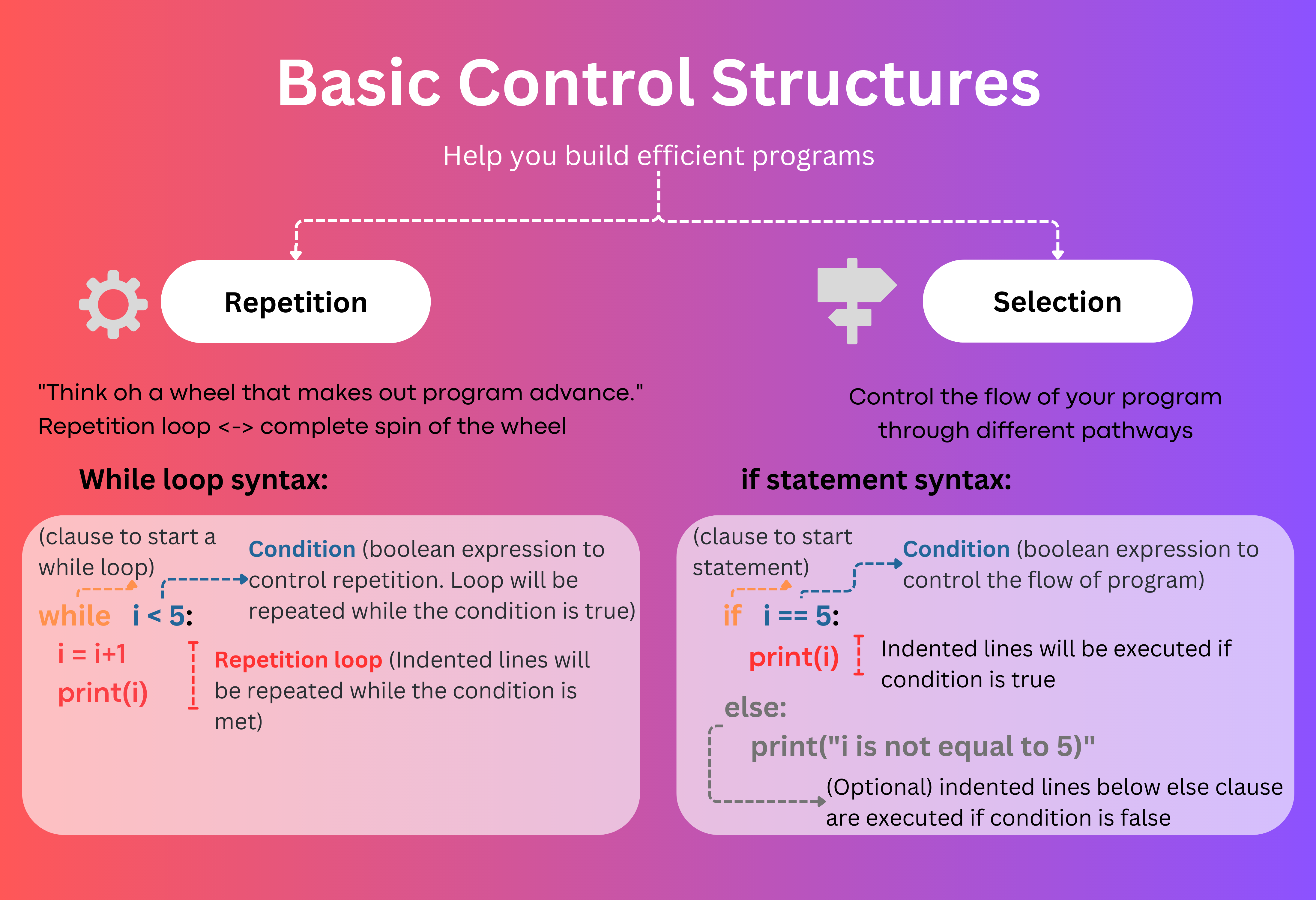
First, let us recap some basic features of logical expressions and boolean variables
Basic features of Logical expressions and Boolean variables
Boolean variables are named after the great mathematician George Boole who developed a symbolic language and operations to express complex logical expression and perform algebra and calculus operations. Back in the last days of the XIX century, mathematicians were divided into two groups. On one hand, there were those who believed that all mathematics could be derived from a set of basic axioms and using logical operators, like Boole. In this side were others like Gottlob Frege, who thought that logic could be used to model any aspect of reality, and developed the Concept Script. Definitely these are early (but prominent!) precursors of computer programming. On the other hand, there were those who believed that this fundamentalist vision was nonsense. With time, the former group of mathematicians devised computing machines specialised in binary logic and able to perform any mathematical operation, while the latter thought that this was just an illusion and that calculus and algebra were intrinsically too complex to be described just by logic. It is said that during the congress that took place in the International Exposition of 1900 in Paris, both groups had a harsh and intense debate. Later, other great mathematicians like Alan Turing took on the work of Boole and led the ground for modern day computer. Logicomix: An Epic search of truth is a delightful comic that vividly describes this journey. Now, looking backwards, one can only fear sorry for those that so fiercely debated against logic.

So, back to computer programming, the main aim of logical expressions is to enable the use of logic to build complex processes. Basically, we will use logical expressions to evaluate conditions. The result of this evaluation will be a boolean variable with values either True or False, and these results will control complex workflows through selection and repetition control structures (Boole would be so proud!).
Let us use the following code snippet to settle down the main concepts.
[2]:
x = 2 # This is an Integer variable
print(x == 2) # This is a logical expression comparing x to 3. It will only be True if both sides are identical

A = x == 2 # This is an assignment of a Boolean variable A to the result of the logical expression printed in the line above (x == 2). Bottom line is we can use the results of logical expressions as variables in our code.

B = False # This is an assignment of a Boolean variable B to the (literal) boolean value False.


print(A and B) # This is a logical expression combining A and B. Only true if both are true.
print(not A) # This is another logical expression negating A.
True
False
False
☝ Notice that variable assignment is done using a single equals operator
=, whereas comparison between two variables is done using the double equals operator==. The “not equals” operator is marked as!=.
Selection Control Structures: Conditional expressions
Recall that, in the structure theorem, the selection control structure uses conditional expressions to assess a condition and control the code block (branch control) that will be executed. The most basic selection statement in Python is the if statement. In its most basic form, the if statement evaluates an expression and only executes the indented code below the conditional expression if it evaluates to true:
if condition: #`condition` represents a conditional expression or boolean variable that evaluates either to True or False
    x = 4 # Indented code is only executed if `condition`evaluates to True
print(x)
☝ Be aware of indentation! Indented code will be executed if the condition is met, so you need to be careful and indent only the right number of lines
Optionally, the if statement can include an else clause. Indented code after the else clause will only be executed if the conditional expression of the if else statement evaluates to false:
[1]:
x = 2
if x == 2:
    print("x equals two!")
else:
    print("x does not equal to two.")
print("this line is not indetend and therefore not part of the else statement!")
x equals two!
These type of expressions are known as conditional statements and can be nested to build more complex control structures as described below.
elif clause: one if inside another if
Additionally, the if statement can contain additional (nested) conditional expressions which are only evaluated if the logical expression of the if statement is false, using elif clauses. The keyword elif is a shorthand of an if statement following an else clause, and it includes an additional expression to be evaluated. If all logical expressions are false (included in the if statement and in all additional elif clauses), then (optionally) the code under the
else statement is executed.
[3]:
false_statement = False
true_statement = True
if false_statement is True:
    print("Can't be possible")
elif true_statement is True: # else if
    print("Yes!")
else:
    print("Never here")
Yes!
☝ Remember, the elif clauses will only be evaluated if the conditional expression in the if statement evaluates to false.
Ok, let us see this in practice with an exercise. Let us build a program that asks the user for a grade in a scale from 0 to 100 percent and the program returns the corresponding letter grade in the following grading system:
Letter Grade |
Percentage Range |
|---|---|
A+ |
90% to 100% |
A |
80% to 90% |
B+ |
75% to 80% |
B |
70% to 75% |
C+ |
65% to 70% |
C |
60% to 65% |
D+ |
55% to 60% |
D |
50% to 55% |
E |
40% to 50% |
F |
0% to 40% |
Try on your own to implement the own solution in the cell below!
[ ]:
percent_grade = float(input("Enter your grade in percent"))
grade_letter = "F" # Use this variable to return the grade letter
# Insert your code in here

print("Your grade letter is:", grade_letter)
Compounded conditionals
Note that you can use boolean operators such as and or or to combine conditions. In large compounded conditionals, parentheses can also be used (and highly recommended) to improve code readability.
[2]:
x = 3
y = 5
if (x == 3) and y == 5:
    print("Both are true")
if x == 3 or y == 4:
    print("At least one condition is true")
Both are true
At least one condition is true
Repetition Control Structures: The while clause
We can use logical expressions to build basic control structures using the while clause. The while clause uses a logical expression to control the repetition of the (indented) code that follows, as long as the logical expression evaluates to True, for instance:
[2]:
x = 0
while x < 3:
    print("x is now:", x)
    x += 1
x is now: 0
x is now: 1
x is now: 2
Note that the indented code is repeated on a loop as long as the logical expression evaluates to false.
Break statement
We can use the Break statements to end the loop at any given time. For instance, the following while loop has the same output as the previous example, but uses a logical expression that always evaluates to true and a break statement to end the loop.
[6]:
x = 0
while True:
    print("x is now:", x)
    x += 1
    if x >= 3:
        break
x is now: 0
x is now: 1
x is now: 2
This example is not very illustrative, but for instance, think of a program that would ask the user for input to guess a name, and that would run forever until the user introduces the right guess. Now, try to implement it in the cell below. The use of the break statement is not mandatory, but it could certainly improve readability!
[ ]:
my_name = "Francisco"
# Enter your code here
☝ Take into account that the break statement breaks the repetition of the while loop it is contained into, if you nest multiple while loops, it will only break the inner loop!
Continue statement
The continue statement forces the control logic to go back to the beginning of the loop, but does not interrupt it, it will still continue until the logical expression in the while clause evaluates to false:
[8]:
x = 0
y = 0
while x < 5:
    x = x+1
    if x%2 == 0: # Recall that that % is the modulo operator, returning the reminder after integer division.
        # We will only reach here when x is even
        print(x, "is an even number")
        continue
    y += x # Since continue returns to the beginning of the loop, we do not reach this line for even numbers
    print(x, "is an odd number")

print("the value of y is", y)
1 is an odd number
2 is an even number
3 is an odd number
4 is an even number
5 is an odd number
the value of y is 9
While else statement
Optionally, the while clause can contain an else clause, which executes the indented code below when the expression evaluates to false:
[4]:
x = 0
while x < 3:
    print("x is now:", x)
    x += 1
else:
    print("x has reached the limit")
    print("x is now:", x)
x is now: 0
x is now: 1
x is now: 2
x has reached the limit
x is now: 3
Note that the last line of the code is executed anyways once the program exits the while loop, so the addition of the else clause is not very practical in this example, but it improves code readibility.
Extra: A precise definition of True
We do not aim to get philosophical, but it at this point it is important to precisely define when an statement in a conditional expression will evaluate to True. A statement is evaluated as True if one of the following is correct:
The
Trueboolean variable is given, or calculated using an expression, such as a comparison between to numeric values.An object which is not considered empty is passed.
It follows that if an object that is considered empty is passed to evaluate the conditional expression, it will evaluate as False. The objects which are considered as empty are:
An empty string: “”
An empty list: []
The number zero: 0
For instance, try the following snippet that prints different lines whether the user enters zero or any other integer number
[ ]:
a_number = int(input("Enter a integer number:"))
if a_number: # Note that we do not use a logical operator to evaluate if the number is greater than zero
    print("You entered a number greater than zero")
else:
    print("You entered zero")
Ok, we tried, but it is impossible to not get philosophical at this point. Emptiness evaluates to False, and the lack of emptiness to True. This is a common convention across different programming languages and comes from the fact that the boolean value False is normally encoded as a 0 in memory (recall that, in the end, everything is binary code in memory). However, to make falseness equivalent to emptiness undoubtedly has some philosophical implications, as highlighted in this passage of the novel Snow Crash by Neal Stephenson:
Computers rely on the one and the zero to represent all things. This distinction between something and nothing, this pivotal separation between being and non-being, is quite fundamental and underlies many creation myths.
Now, if you review the creation myth of your culture and reflect on the equivalence of falseness and emptiness, you will definitively get another interesting perspective!